AuditGuide×Word
Create audit-ready documents in your familiar environment — AuditGuide's full AI power directly in your Word document.

Audit-ready documents
directly in Microsoft Word
From blank document to audit evidence — directly in Word
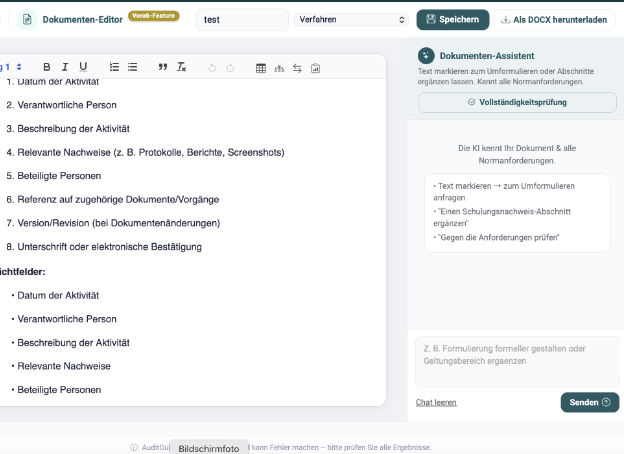
The AuditGuide Word Plugin brings the same AI quality as the web platform directly into your Word document — create, refine, and adapt documents to standard requirements, all within your familiar workflow.
Directly in Microsoft Word
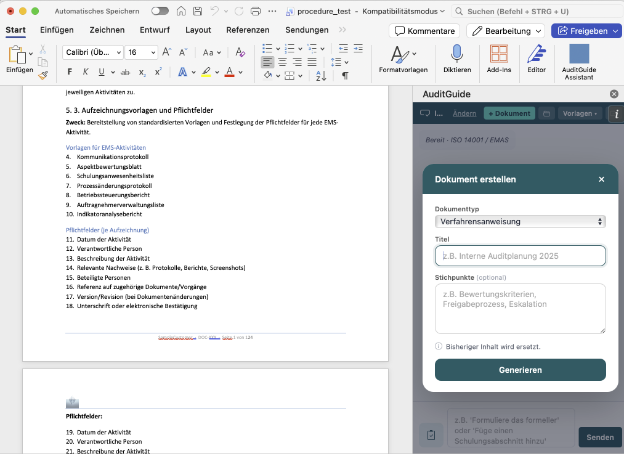
The plugin opens as a sidebar in Word — no tab switching, no context loss. Your document stays in view at all times.
Choose document type and generate
Declaration, procedure instruction, work instruction — enter a title, optionally add bullet points, and AuditGuide instantly generates a complete, standards-compliant draft.
Everything you need to get started
Download the installation files and set up the plugin in minutes. If you have any questions, our support team is available at any time.
manifest.xml (Version 1.0.1.4)
The add-in manifest file for the Microsoft 365 Admin Center. Required for centrally deploying the plugin to all users.
Download manifest.xmlInstallation Guide (PDF)
Step-by-step guide for setup in the Microsoft 365 Admin Center — with screenshots for each installation step.
Open Guide